SKU: C5F97A
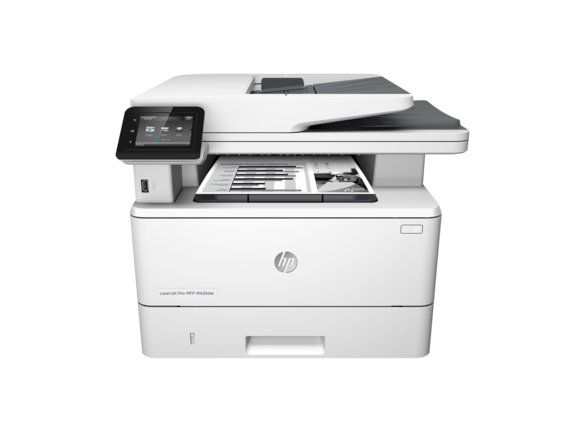
HP LaserJet Pro MFP M427dw
- Print technology
- Laser
- Display
- 7.5 cm (3) intuitive touchscreen Colour Graphic Display (CGD)
Contact us for pricing
Key features
- Touchscreen
- Automatic document feeder
- JetIntelligence cartridge
- Optional high-capacity trays
- Front USB flash drive port
- Scan to email
- Scan to PDF
- Two-sided printing
- Print from mobile device
- Fast wake-up and print
- Fast two-sided printing
- Scan to various destinations
Technical specifications
Product
| UPC number | (AB2) 888793340691; (ACJ) 888793340707 |
|---|---|
| Product type | Laser printers |
| Subcategory | Single and multifunction printers |
Storage
| Storage temperature range | -20 to 40°C |
|---|
Display
| Display | 7.5 cm (3) intuitive touchscreen Colour Graphic Display (CGD) |
|---|---|
| Display area (metric) | 7 x 5.56 cm |
Wireless
| Wireless capability | Yes, built-in Wi-Fi; Authentication via WEP, WPA/WPA2, WPA Enterprise; encryption via AES or TKIP; WPS; Wi-Fi Direct |
|---|
Ports
| Ports | 1 Hi-Speed USB 2.0; 1 Host USB; 1 Gigabit Ethernet 10/100/1000T network; 1 Wireless 802.11b/g/n; Easy-access |
|---|
Battery and power
| Power supply type | Internal (Built-in) power supply |
|---|
Software
| Compatible Operating Systems | Windows OS compatible with In-Box Driver; Windows XP SP3 all 32-bit editions (XP Home, XP Pro, etc.); Windows Vista all 32-bit editions (Home Basic, Premium, Professional, etc.); Windows 7 all 32- & 64-bit editions; Windows 8/8.1 all 32- & 64-bit editions (excluding RT OS for Tablets); Windows 10 all 32- & 64-bit editions (excluding RT OS for Tablets); Windows OS compatible with Universal Print Driver (From http://www.HP.com); Windows XP SP3 32- & 64-bit editions (XP Home, XP Pro, etc.); Windows Vista all 32- & 64-bit editions (Home Basic, Premium, Professional, etc.); Windows 7 all 32- & 64-bit editions; Windows 8/8.1 all 32- & 64-bit editions (excluding RT OS for Tablets); Windows 10 all 32- & 64-bit editions (excluding RT OS for Tablets); Mac OS (HP Print Drivers available from http://www.HP.com and Apple Store); OS X 10.8 Mountain Lion; OS X 10.9 Mavericks; OS X 10.10 Yosemite; Mobile OS (In-OS drivers); iOS, Android, Windows 8/8.1/10 RT; Linux OS (In-OS HPLIP; Auto install; BOSS (3.0, 5.0); DEBIAN (6.0, 6.0.1, 6.0.2, 6.0.3, 6.0.4, 6.0.5, 6.0.6, 6.0.7, 6.0.8, 6.0.9, 6.0.10, 7.0, 7.1, 7.2, 7.3, 7.4, 7.5, 7.6); FEDORA (17, 18, 19, 20); LINUX MINT (13, 14, 15, 16, 17); SUSE LINUX (12.2, 12.3, 13.1); UBUNTU (10.04, 11.10, 12.04,12.10, 13.04, 13.10, 14.04, 14.10); Manual install; MANDRIVA LINUX (2010.0, 2011.0); MEPIS (6.0, 6.5, 7.0, 8.0); PCLINUXOS (2006.0, 2006, 2007.0, 2007, 2008.0, 2008, 2009.0, 2009); RED HAT (8.0, 9.0); RED HAT ENTERPRISE LINUX (5.0, 6.0, 7.0); SLACKWARE LINUX (9.0, 9.1, 10.0, 10.1, 10.2, 11, 12, 12.1); GOS (8.04.1); IGOS (1.0); LINPUS LINUX (9.4, 9.5); LINUX FROM SCRATCH (6); Other OS; UNIX |
|---|---|
| Copier smart software features | Instant-on copy; up to 99 multiple copies; Scan once print many; Collation; Reduce/enlarge from 25 to 400% (with page size presets); Fit to page; Customizable copy presets (two or four pages to one page); Contrast (lighter/darker); Resolution (copy quality); Network protocols supported; ID copy; Optimize copy selection (with presets: autoselect, mixed, printed picture, photograph, text), 50-page automatic document feeder |
| Printer smart software features | Auto-duplex printing, N-up printing, collation, HP ePrint, Apple AirPrint™, Google Cloud Print, wireless direct printing, Mopria-certified, HP Auto-On/Auto-Off, Intiutive 7.62 cm (3) touchscreen control panel, Print from Cloud using business apps on the control panel, HP JetAdvantage Private Print, Job Storage with PIN printing, Print from USB, JetIntelligence Cartridge Technology |
| Print Technology | Laser |
|---|---|
| Mobile printing capability | HP ePrint; Apple AirPrint™; Mopria™-certified; Wireless Direct Printing; Google Cloud Print 2.0; Mobile Apps |
| Acoustic power emissions (active, printing) | 6.8 B(A) (printing at 38 ppm) |
| Acoustic pressure emissions bystander (active, printing) | 55 dB(A) |
Copy and scan
| Scanner advanced features | Scan-to-E-mail; Scan-to-cloud; Scan-to-USB; Scan-to-network folder; LDAP e-mail lookup; Simplex scanning ADF (50-sheet) |
|---|---|
| Copy reduce / enlarge settings | 25 to 400% |
| Copy resolution (black graphics) | 600 x 600 dpi |
| Copy speed (black, normal quality, A4) | Up to 38 cpm |
| Copy speed black (normal, letter) | Up to 40 cpm |
| First copy out black (A4) | As fast as 7.2 sec |
| First copy out black (A4, sleep) | As fast as 9.7 sec |
| First copy out black (letter, sleep) | As fast as 9.1 sec |
| First copy out black (letter) | As fast as 6.8 sec |
| Acoustic power emissions (active copy) | 6.9 B(A) (copying with ADF running) |
| Acoustic power emissions (active scan) | 6.3 B(A) (scanning with ADF running) |
| Acoustic pressure emissions bystander (active scan) | 48 dB(A) (scanning with ADF running) |
Physical
| Maximum dimensions (W x D x H) | 430 x 634 x 325 mm |
|---|---|
| Dimensions (W x D x H) | 420 x 390 x 323 mm |
Package
| Package dimensions (W x D x H) | 497 x 398 x 490 mm |
|---|---|
| Pallet dimensions (W x D x H) | 1200 x 1000 x 2605 mm (NA), 1200 x 1000 x 2115 mm (EMEA, APJ) |
Sustainability
| Ecolabels | CECP |
|---|---|
| Sustainability specifications | Mercury free |
| Energy Usage CO2e (kg) | 289 |
| End of Life CO2e (kg) | 18 |
| Production CO2e (kg) | 90 |
| Total CO2e (kg) | 401 |
| Transportation CO2e (kg) | 4 |
Warranty and service
| Manufacturer Warranty | 1 Year Limited Warranty (Return to HP/Dealer - Standard Bench Repair) |
|---|---|
| Network protocols, supported | TCP/IP, IPv4, IPv6; Print: TCP-IP port 9100 Direct Mode, LPD (raw queue support only), Web Services Printing, HP ePrint, Apple AirPrint™, Google Cloud Print 2.0, Mopria, FTP Print, IPP Print; Discovery: SLP, Bonjour, Web Services Discovery; IP Config: IPv4 (BootP, DHCP, AutoIP, Manual), IPv6 (Stateless Link-Local and via Router, Statefull via DHCPv6), SSL Security and Certificate management; Management: SNMPv1, SNMPv2, SNMPv3, HTTP/HTTPS, Syslog, FTP FW Download |
| File Format Supported | Scan to USB device and scan from the front panel to a network folder both only support: JPG, PDF |
Other
| Connection type | Wireless |
|---|---|
| Minimum System Requirements | Windows 10 (32-bit/64-bit), Windows 8.1 (32-bit/64-bit), Windows 8 (32-bit/64-bit), Windows 7 (32-bit/64-bit): 1 GHz processor, 1 GB RAM (32-bit) or 2 GB RAM (64-bit), 400 MB available hard disk space, CD/DVD-ROM or Internet, USB or Network port; Windows Vista (32-bit): 1 GHz 32-bit (x86) processor, 1 GB RAM (32-bit), 400 MB available hard disk space, CD/DVD-ROM or Internet, USB or Network port; Windows XP (32-bit) (SP2): Pentium 233 MHz processor, 512 MB RAM 400 MB available hard disk space, CD/DVD-ROM or Internet, USB or Network port; Windows Server 2003 (32-bit) (SP1 or greater), Windows Server 2003 R2 (32-bit), Windows Server 2008 (32-bit) (SP1 or greater): 1 GHz 32-bit (x86) processor, 1 GB RAM (32-bit), 400 MB available hard disk space, CD/DVD-ROM or Internet, USB or Network port; Windows Server 2008 (64-bit) (SP1 or greater), Windows Server 2008 R2 (64-bit), Windows Server 2008 R2 (64-bit) (SP1): 1 GHz 64-bit (x64) processor, 2 GB RAM (64-bit), 400 MB available hard disk space, CD/DVD-ROM or Internet, USB or Network port |
| What's in the box | HP LaserJet Pro M427dw; Preinstalled HP 28A Black LaserJet Toner Cartridge (~3000 pages); Getting Started Guide; Setup Poster; Support Flyer; Warranty Guide; Printer documentation and software on CD-ROM; Power cord; USB cable |
| Energy savings feature technology | Instant-on Technology; HP Auto-On/Auto-Off Technology |
| Power consumption | 583 watts (Print/Copy), 9.1 watts (Ready), 2.7 watts (Sleep), 0.7 watts (Auto-On/Auto-Off, via USB connectivity), 0.1 watts (Shutdown or Off) |
| Power | 110-volt input voltage: 110 to 127 VAC (+/- 10%), 50/60 Hz (+/- 2 Hz); 220-volt input voltage: 220 to 240 VAC (+/- 10%), 50/60 Hz (+/- 2 Hz) (Not dual voltage, product varies by part number with # Option code identifier) |
| Cable included | Yes, 1 USB cable |
| Registration required | No |
| Print Cartridges/Bottle, Number | 1 (black) |
| Replacement cartridges | HP 28A Black LaserJet Toner Cartridge (~3000 pages), CF228A; HP 28X Black LaserJet Toner Cartridge (~9200 pages), CF228X |
| Supplies feature | HP JetIntelligence Cartridge |
| Brand | HP |
| Sub brand | LaserJet Pro |
| Electromagnetic compatibility | CISPR 22: 2008/EN 55022:2010 - Class B, EN 61000-3-2:2006 +A1:2009 +A2:2009, EN 61000-3-3:2008, EN 55024:2010, FCC Title 47 CFR, Part 15 Class B/ICES-003, Issue 5, GB9254-2008, GB17625.1-2012 |
| Safety | IEC 60950-1:2005 +A1:2009+A2:2013/EN 60950-1:2006 +A11:2009 +A1:2010+A12:2011+A2:2013; IEC 60825-1:2007/EN 60825-1:2007 (Class 1 Laser/LED Product); IEC 62479:2010/EN 62479:2010; GB4943-2011 |
| Telecom compliance (fax capability) | Wireless telecommunications: EU (R&TTE Directive 1999/5/EC, EN 301 489-1 V1.9.2, EN 301 489-17 V2.2.1, EN 300 328 V1.8.1; US (FCC 15.247); Canada RSS-210, IEC 62311:2007, EN 62311:2008 |
| Accessories | HP LaserJet 550-sheet Feeder Tray D9P29A; HP v222w 16GB Mini USB Drive P0R81AA |
| Connectivity | Apple AirPrint™; HP ePrint; Wireless direct printing; Ethernet networking; Google Cloud Print™; Mopria™; USB; Wireless (Wi-Fi®) |
| Number of users | 3-10 Users |
| Connectivity, standard | 1 Hi-Speed USB 2.0; 1 Host USB; 1 Gigabit Ethernet 10/100/1000T network; 1 Wireless 802.11b/g/n; Easy-access |
| HP ePrint capability | Yes |
| Network capabilities | Yes, via built-in 10/100/1000Base-TX Ethernet, Gigabit; Auto-crossover Ethernet; Authentication via 802.1X |
| Network ready | Standard (built-in Ethernet, Wi-Fi) [Operates as both an AP (with Wi-Fi Direct) and STA] |
| Plug and play | Auto Wireless Connect |
| Copier settings | Light/Darker; ID copy; Optimize; Draft Mode |
| Copies, maximum | Up to 99 copies |
| Digital sending standard features | Scan-to-E-mail; Scan-to-network folder; Scan-to-Cloud |
| Business filter | cMPS |
| Component type | Printer |
| Printer black pages (MPV black) | 1000 |
| Acoustic power emissions (ready) | Inaudible |
| Non-Operating Humidity Range | 10 to 90% RH |
| Operating humidity range | 10 to 80% RH |
| Recommended operating humidity range | 30 to 70% RH |
| Operating temperature range | 15 to 32.5°C |
| Recommended operating temperature range | 17.5 to 25°C |
| Functions | Multifunction / All-in-One |
| Form factor | Multifunction |
| Country of origin | Made in China (C5F97A#AB2); Product of Philippines, assembled in China (C5F97A#ACJ) |
| Web address for additional information | Solutions: http://www.hp.com/go/gsc; Fonts and IPDS Emulation: http://www.hp/com/go/laserjetfonts; Services: http://www.hp.com/services/printer; Paper:http://www.hp.com/go/paper; HP ePrint center for business apps: http://www.hp.com/go/ePrintCenter |
| Differentiator (features) | Impressive speed. Solid security. |
| Why to buy | Fast print, scan, and copy performance plus robust, comprehensive security built for how you work. This MFP finishes key tasks faster and guards against threats.[1] Original HP Toner cartridges with JetIntelligence give you more pages.[2] |
| Headline | Easily produce the documents you need to keep work flowing while conserving power. This energy-efficient MFP is easy to manage and use. Print Microsoft® Word and PowerPoint® documents directly from the USB port,[5] using the intuitive touchscreen.[6] |
| Key selling point | Get the most prints for your money—with Original HP High Yield Black Toner cartridges with JetIntelligence.[2] |
Notes and footnotes
- A product carbon footprint is defined as the total amount of greenhouse gases emitted directly and indirectly by a product over its lifetime. Greenhouse gas emissions are reported as global warming potential for 100-year time horizon (GWP-100) in units of CO2 equivalence. Calculations are done in accordance with ISO 14040 & ISO 14044. Individual values may not sum to total due to rounding.
- [1] Based on HP internal testing of top three leading competitors’ first page out from sleep mode and duplex print and copy speed completed 8/2015. Subject to device settings. Actual results may vary. For details see http://www.hp.com/go/Ljclaims
- [2] Based on cartridge yields for HP 80X compared with HP 28X Original HP LaserJet Toner Cartridges. For more information, see http://www.hp.com/go/learnaboutsupplies
- [3] Requires an Internet connection to the printer. Services may require registration. App availability varies by country, language, and agreements. For details, see http://www.hpconnected.com
- [1] Declared yield value in accordance with ISO/IEC 19752. Actual yields vary considerably based on images printed and other factors. For more information, visit http://www.hp.com/go/learnaboutsupplies
- [5] Microsoft and PowerPoint are U.S. registered trademarks of the Microsoft group of companies. Feature works with Microsoft Word and PowerPoint 2003 and later. Only Latin language fonts are supported.
- [2] Without optional 550-sheet tray; Dimensions with optional 550-sheet tray: 16.54 x 15.35 x 17.80 in (420 x 390 x 452 mm)
- [6] Requires a wireless access point and an Internet connection to the printer. Services require registration. App availability varies by country, language, and agreements and requires a firmware upgrade. For details, visit http://www.hpconnected.com
- [3] Job Storage feature requires a purchase of separate USB flash drive with a minimum of 16 GB capacity.
- [7] HP Web Jetadmin is free and available for download at http://www.hp.com/go/webjetadmin
- [4] HP SureSupply alerts you when your print cartridge is running low and helps you purchase online or locally through HP or a participating retailer. For more information, visit http://www.hp.com/go/SureSupply; Only available with Original HP supplies; Internet access required.
- [8] Based on HP testing using the ENERGY STAR® program’s Typical Electricity Consumption (TEC) method or as reported in energystar.gov of top three leading competitors as of 8/2015. Actual results may vary. For details see http://www.hp.com/go/Ljclaims
- [5] HP recommends that the number of pages per month of imaged output be within the stated range for optimum device performance, based on factors including supplies replacement intervals and device life over an extended warranty period.
- [9] Wireless operations are compatible with 2.4 GHz operations only. App or software and HP ePrint account registration may also be required. Some features require purchase of an optional accessory. Learn more at http://www.hp.com/go/mobileprinting
- [6] Measured using ISO/IEC 24734, excludes first set of test documents. For more information see http://www.hp.com/go/printerclaims. Exact speed varies depending on the system configuration, software application, driver, and document complexity.
- [10] Wireless performance is dependent on physical environment and distance from access point, and may be limited during active VPN connections.
- [7] Measured using ISO/IEC 17629, excludes first set of test documents. For more information see http://www.hp.com/go/printerclaims. Exact speed varies depending on the input voltage, system configuration, software application, driver, and document complexity.
- [11] Mobile device needs to be connected directly to the Wi-Fi network of a wireless direct–capable MFP or printer prior to printing. Depending on mobile device, an app or driver may also be required. Learn more at http://www.hp.com/go/businessmobileprinting
- [8] First Copy Out and Copy Speed measured using ISO/IEC 29183, excludes first set of test documents. For more information see http://www.hp.com/go/printerclaims. Exact speed varies depending on the system configuration, software application, driver, and document complexity.
- [9] Scan speeds measured from ADF. Actual processing speeds may vary depending on scan resolution, network conditions, computer performance, and application software.
- [10] For Scan software (included in the box) support: Windows [JPG, RAW(BMP), PDF, TIFF, PNG, RTF] and Mac [JPG, JPG-2000, TIFF, PNG, PDF, RTF, TXT]
- [11] Not all "Compatible Operating Systems" are supported with inbox software; Full solution software available only for Windows 7 and newer; Legacy Windows Operating Systems (XP, Vista, and equivalent servers) get print drivers only; Windows RT OS for Tablets (32-bit & 64-bit) uses a simplified HP print driver built into the RT OS; UNIX Modelscripts are available on HP.com ( Modelscripts are printer drivers for UNIX operating systems); Linux systems use in-OS HPLIP software; HP Software for Mac is no longer included on the CD, but can be downloaded from http://www.hp.com - the Mac driver and Mac Utility are installed for Mac operating systems.
- [12] Power requirements are based on the country/region where the printer is sold. Do not convert operating voltages. This will damage the printer and void the product warranty.
- [15] With 28A cartridge
- [16] Best Typical Electricity Consumption (TEC) rating represents the typical electricity consumed by a product during 1 week, measured in kilowatt-hours (kWh). For Best TEC, the product configuration is Wi-Fi disabled, 1 minute sleep delay, and connected to LAN.
- [17] Configuration tested: base model, simplex printing, A4 paper at an average of 38 ppm; active scan at 26 ppm
- [18] Measured using ISO/IEC 24734 Feature Performance Test, excludes first set of test documents. For more information see http://www.hp.com/go/printerclaims. Exact speed varies depending on the system configuration, software application, driver, and document complexity.
- [19] Typical Electricity Consumption (TEC) rating represents the typical electricity consumed by a product during 1 week, measured in kilowatt-hours (kWh).
- [20] HP recommends that the number of scanned pages per month be within the stated range for optimum device performance